
Standard Artwork Templates
Unlock flawless custom card printing processes with our comprehensive standard artwork templates, and , each template adapts to various printers and cutting machines. Master file setup, color conversion, and delivery techniques.
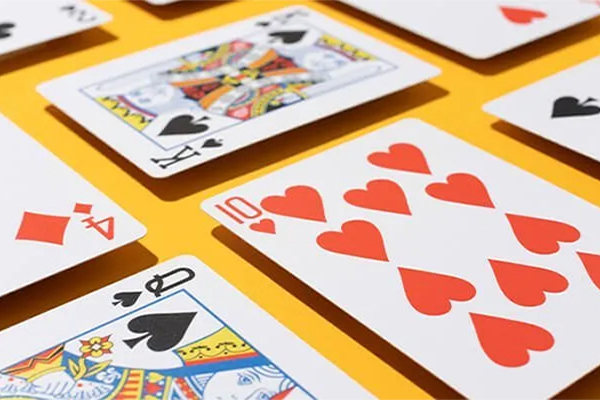
Whether you’re a seasoned designer or a creative newcomer, crafting the perfect printed piece can be an exciting journey. But navigating the technical aspects – like sizing, bleed, and margins – can dampen the creative spark.
That’s where art templates come in, offering a helping hand to transform your vision into tangible reality. Our Standard Artwork Templates page covers the most commonly used sizes and formats in the industry, including card size, packaging size, and booklet size.
Each template can be easily downloaded and adapted to a variety of printers and cutting equipment. You can also customize the fronts and backs of your cards, the exteriors and interiors of your boxes, and the number of pages of your booklets.
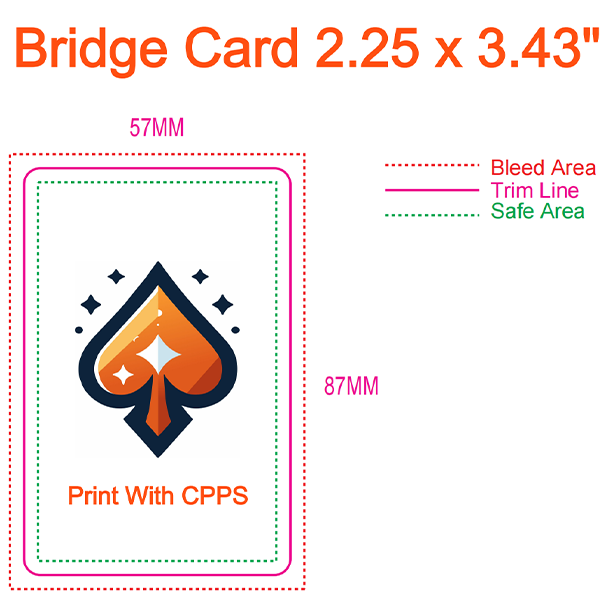
Template Example
Each template comes with 3 important guidelines:
Safe Zone (Green Dotted Line)
Anything within this area is safe, so keep all crucial text and visual content within it.
Trim Line (Purple Solid Line)
This line marks the edge of the final product. We will trim your card along this line to the corresponding size (e.g. 57x87mm).
Bleed Area (Red Dotted Line)
Everything between the red line and the purple line will be trimmed off. Considering irregular white borders due to cutting errors, you should extend your design to the edge of this area.
Why Should You Use the Art Templates?
Consider the industry-standard sizes in first when creating customized playing cards. Common dimensions for playing cards, game cards, and tarot cards are as follows:
Size Name
Card Size (mm)
Inch Conversion (≈”)
Poker
63.5 x 88.5
2.5 x 3.50
Euro Poker
63 x 88
2.48 x 3.46
Bridge
57 x 87
2.24 x 3.43
Tarot
70 x 120
2.76 x 4.72
Oracle
88 x 126
3.46 x 4.96
Jumbo
120 x 170
4.72 x 6.69
Business
51 x 86
2.01 x 3.39
Mini
45 x 63
1.77 x 2.48
Domino
45 x 90
1.77 x 3.54
Small
48 x 72
1.89 x 2.83
Index
76 x 114
2.99 x 4.49
Square
89 x 89
3.50 x 3.50
You can use graphic software capable of exporting files in PDF, EPS, AI, or PSD formats. Alternatively, you can explore our online design tool for future projects, allowing you to upload images, insert text, and adjust layouts.
Different types of decks vary in the number of cards they contain. Beyond the standard count, you can customize the number of cards—increasing or decreasing. However, altering the card count impacts the number of master plates required for initial printing. More master plates result in higher costs.
For instance, using poker size as a reference, a deck with 55 cards or fewer (regardless of similar or different front and back designs) requires only 2 master plates (one for the front and one for the back). Once the card count exceeds 55, the number of printing plates rises, leading to an exponential increase in the final deck price.

Below are the ideal card quantities for various card stock options and sizes, all achievable with just two parent plates (front and back), which is the most economical option:
Blue Core/ Art Paper/ Plastic Cards
Poker size (2.48″x3.46″)
54 cards/deck
Tarot size (2.75″x4.75″)
29 cards/deck
Square size (2.5″x2.5″)
65 cards/deck
Mini size (1.61″x2.48″)
95 cards/deck
Poker size (2.48″x3.46″)
55 cards/deck
Tarot size (2.75″x4.75″)
34 cards/deck
Square size (2.5″x2.5″)
71 cards/deck
Mini size (1.61″x2.48″)
107 cards/deck
All these templates can be individually tailored for both sides, accommodating unique designs on the front and back.
If you prefer a design exclusively for either the front or back, feel free to contact us for a complimentary commercially available template. For complete personalization, you can submit your design artwork for each side. But keep in mind that having distinct back designs for each card may affect the overall cost.
We support external printing and internal + external printing for boxes to meet higher product requirements. The box are sized to match the chosen deck size, allowing for consistent and cohesive packaging.
The most common packaging options for playing cards are tuck boxes. Tuck boxes are made of white paper or cardboard and can be opened by tucking in the flaps. They can be customized with your own design, logo, and text on the exteriors and interiors.
Common dimensions for tuck boxes are as follows:
Number of Cards
Card Size (mm)
Inch Conversion (≈”)
54 Poker Cards
63.5 x 89
2.5 x 3.50
75 Poker Cards
63.5 x 89
2.5 x 3.50
108 Poker Cards
63.5 x 89
2.5 x 3.50
60 Business Cards
50 x 89
1.97 x 3.50
75 Large Cards
89 x 127
3.50 x 5
Booklet sizes are important for containing game instructions, story details, or other content related to the cards. The number of pages in a booklet can be customized, and we offer templates for booklets of any number of pages. Whether it’s a cross fold, bi-fold, or z-fold, the booklet templates cater to different folding or binding methods.
The page count plays a crucial role in booklet customization. We offer flexibility in creating booklets with varying page numbers, contingent upon your selection of the appropriate folding or binding method based on your specific page requirements.
Calculating the number of pages can be confusing for you, but understanding the mechanics of booklet printing makes it straightforward. In our booklets (excluding cross fold), the calculation method aligns with other printed materials like books. Page 1 initiates on the right side, with each side of the paper counting as a page. Consequently, flipping to the next page, Page 1 becomes Page 2 on the left, Page 3 on the right, and so forth.
When designing booklets with blank pages, these still contribute to the overall page count. In certain instances, we might recommend adding a blank page after an odd-numbered (right) page to ensure the start of the next chapter on a new right page.
Specific folding methods, such as cross fold, bi-fold, and Z-fold, have predetermined page counts—8 pages, 4 pages, and 6 pages, respectively. Accordion starts at 8 pages, allowing for additional pages in multiples of two. Note that for larger page counts, we recommend using saddle stitch or perfect bound bindings to enhance the reading experience.
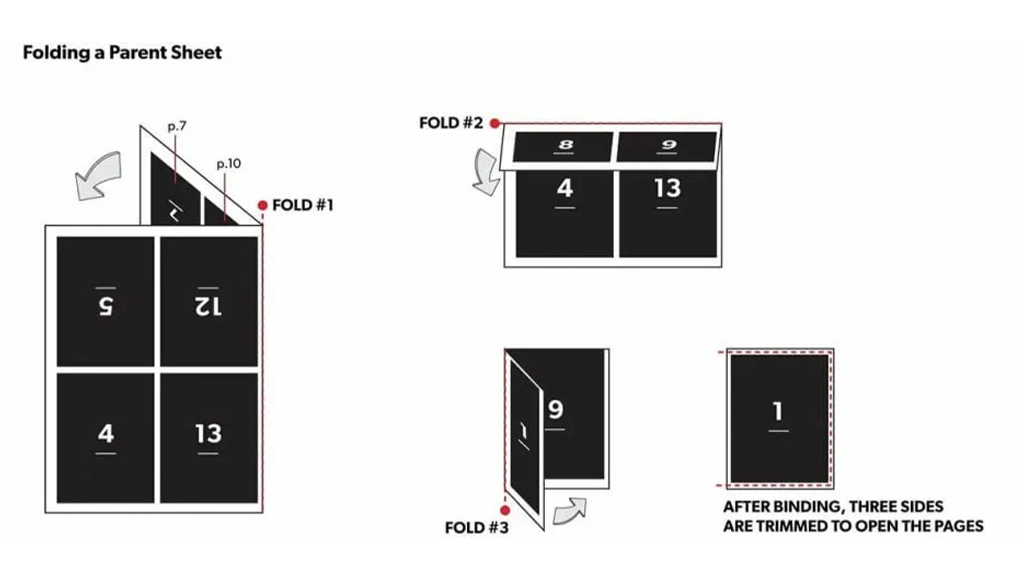
In the case of saddle-stitched and perfect-bound booklets, the chosen page count must be a multiple of four due to their parent plate and cutting process. These binding methods have maximum and minimum page values, influenced by factors like paper thickness. Adjustments in paper thickness will correspondingly affect the maximum page value. Similarly, perfect-bound booklets have minimum page values to ensure a sufficient spine thickness.

As booklets fall under the broader category of book printing, we advise against the use of generic templates. When finish all text formatting, kindly organize and label your pages systematically. Subsequently, generate two PDF documents: one labeled “Cover Pages” and the other “Inner Pages”.
To use the templates, you need to follow these steps:
1. Ask us for and download a template that matches your desired size and format.
2. Open the template in your graphic software or online design tool.
3. Make CMYK Color Conversion settings as needed.
4. Observe the Bleed Area (3mm) and extend the unimportant background beyond the bleed line.
5. Edit the template with your vectorized and important Logo, Text & Images within the Safe Area.
6. Save the file in the required format (PDF, EPS, AI, or PSD).
7. Upload Files to Dropbox, Google Drive, Contact Form or Mailbox, and we will download them from there.
Before your illustrator completes all the files, perhaps you can send us one or two so we can check in advance whether they are suitable for production.
Submitting your work to us is easy with these helpful templates. Download our free templates now, or ask us for more custom sizes!